29. October 2025 | How-Tow

Fall Subscription Diet: Budget Streaming & Services Smartly — Keep the Flat Rate or Rotate?

Fall Subscription Diet: Budget Streaming & Services Smartly — Keep the Flat Rate or Rotate?

Why a subscription check makes sense especially in fall

With shorter days and more time at home, temptations grow: binge-watching, game nights, learning platforms for kids, and new hobby apps. For households, that often means: more active subscriptions, higher monthly burden. Before you pay out of habit, a structured fall subscription diet is worth it.

Quick upfront: Comparing the two budgeting methods

This article focuses on two approaches:

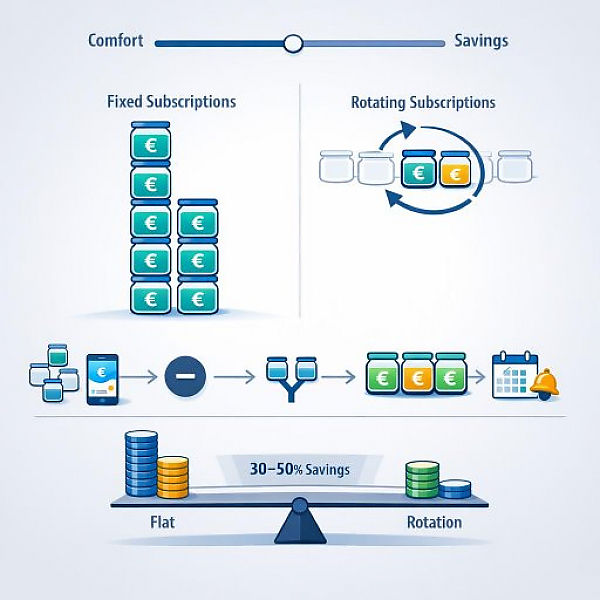
  • Ongoing subscriptions / flat rate - keep multiple services active in parallel long-term.
  • Rotation / pause model - use only 1 to 2 services at a time and switch periodically.

Both models have pros and cons. Below, we explain them, show step-by-step actions, and run through examples.

Subscription audit: First step (regardless of the model)

Before you choose a model, do a subscription audit. Here’s how:

  • List all subscriptions from the last 3 months: name, monthly or annual price, last use, cancellation date.
  • Mark services you don’t use and those you use only rarely.
  • Cancel or pause immediately any services you’ve barely used or not used at all in the last 3 months.
  • Enter all recurring costs in your household budget tracker—small amounts add up.

Model 1: Ongoing subscriptions / flat rate - pros and cons

Pros

  • Convenience: Everyone in the household can access content anytime.
  • No repeated cancelation and reactivation steps.
  • A good option when multiple people consistently need different services.

Cons

  • Higher fixed monthly costs.
  • Less flexibility to save during seasonal months.
  • Less incentive to question services critically.

Model 2: Rotation / pause model - pros and cons

Pros

  • Significant cost reduction is possible because only 1–2 services are active at the same time.
  • Enables seasonal prioritization: streaming focus in fall, outdoor subscriptions in summer, etc.
  • A good way to use special offers and free trials strategically.

Cons

  • Admin effort: canceling, pausing, and later reactivating.
  • Potential reactivation fees or lost favorites/playlists.
  • Not always practical for households with very different usage preferences.

Real-world examples with numbers

The following examples show typical savings and strategies. All numbers are realistic and meant for guidance.

Example 1: Young family of four

Current subscriptions:

  • Streaming A: 12 EUR/month
  • Streaming B: 10 EUR/month
  • Streaming C (kids): 6 EUR/month
  • Game subscription: 8 EUR/month

Total flat-rate model: 36 EUR/month

Rotation model idea: In month 1, active A + C (18 EUR); month 2, active B + C (16 EUR). Average per month over 2 months: (18 + 16) / 2 = 17 EUR.

ModelMonthly costAnnual cost
Flat rate (all in parallel) 36 EUR 432 EUR
Rotation (1–2 active, switch every 1–2 months) 17 EUR (average) 204 EUR

Savings tip: With rotation, you save about 228 EUR per year here—money that can be recorded in your household budget tracker as Entertainment - Savings Fall Subscription Diet.

Example 2: Student

Typical expenses:

  • Streaming A: 10 EUR/month
  • Learning platform: 15 EUR/month
  • Fitness app: 6 EUR/month

Flat rate total: 31 EUR/month. Rotation option: Use the learning platform intensively during exam season (3 months), then pause it. Active cost in the non-exam period, for example, only Streaming A at 10 EUR.

If you pay for the learning platform only 3 months per year: annual cost = 3*15 + 9*10 = 45 + 90 = 135 EUR = 11.25 EUR/month on an annual average. Compared to an ongoing subscription (31 EUR/month), you save noticeably.

Household sharing and role allocation

Practical rules for families and shared apartments:

  • Bundle family plans, set up separate profiles for kids.
  • Record costs proportionally in the household budget tracker—e.g., parents 60/40, kids’ share separately.
  • Agree on rotation phases: e.g., parents choose two services in winter, kids keep one children’s subscription long-term.

Check free alternatives

  • Libraries often offer digital media and learning access for free or very cheaply.
  • Ad-supported versions can be sufficient for occasional users.
  • Check student discounts, seasonal education access, or family benefits—especially in fall.

Manage renewals proactively

  • Turn off auto-renewal if you rotate.
  • Set reminders 7–14 days before the term ends in your calendar or household budget tracker.
  • Wait for special offers or use voucher periods for reactivation.

Decision aid: Which model fits you?

Ask yourself the following questions and write the answers in your household budget tracker:

  • Does each person regularly use different services? If yes, a flat rate is more practical.
  • Are the costs currently a noticeable line item in your budget? If yes, rotation is very worth it.
  • Are cancelation and reactivation fees or lost content a problem? If yes, weigh the trade-offs.

Rule of thumb:

  • With heavy use by multiple people: flat rate or family plan.
  • With seasonal use or when multiple services are rarely needed in parallel: rotation model.
  • Students: use discounts and paid periods only during exam times; rotate in the other months.

A concrete 5-step plan for your fall subscription diet

  • 1. Subscription audit: capture all subscriptions and enter them in your household budget tracker.
  • 2. Cancel/pause immediately: end services you don’t use.
  • 3. Choose a model: flat rate or rotation based on the questions above.
  • 4. Set sharing rules: clarify profile setup and cost shares.
  • 5. Set reminders: 7–14 days before renewal in your household budget tracker or calendar.

Conclusion

Both models are valid. The best choice depends on your household size, usage intensity, and willingness to manage subscriptions. A subscription audit is the first and most important step. With rotation, you can often save 30–50 percent on entertainment and service costs without giving up your favorite content—if you plan the switches well. Record the results in your household budget tracker and review the strategy after 3 months.

Your next step: Do the subscription audit today and enter the numbers in your household budget tracker. Even small changes in fall can bring noticeable relief to your annual budget.


Download the Budget Tracker MyMicroBalance for Windows, Android or iOS






