

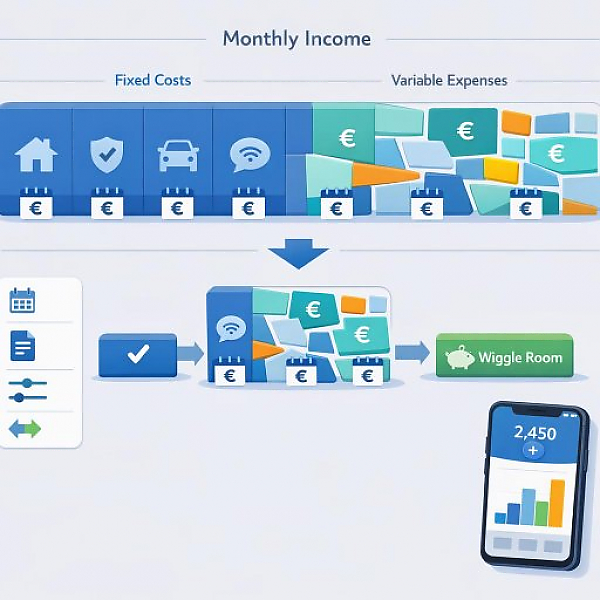
Fixed costs are regularly recurring expenses with a largely consistent amount and a set due date that you have to plan for every month or at fixed intervals—regardless of how much you shop or go out (for example, rent, electricity installment, internet plan).
For clear planning in a digital budget planner, it’s important to separate fixed costs from variable expenses. Variable expenses are payments that aren’t the same every month and depend heavily on your behavior (for example, restaurant visits or clothing).
| Example Expense | Typical Classification | How to Categorize in a Digital Budget Planner (Category + Frequency) |
|---|---|---|
| Rent / apartment | Fixed costs | Category: Housing – Rent Frequency: monthly (fixed amount) |
| Electricity installment | Fixed costs | Category: Housing – Energy Frequency: monthly installment (amount usually stable) |
| Heating installment | Fixed costs | Category: Housing – Heating Frequency: monthly installment; review annual bill |
| Internet and phone plan | Fixed costs | Category: Communication – Internet/Phone Frequency: monthly (flat rate, possibly small fluctuations) |
| Broadcasting fee | Fixed costs | Category: Housing – Fees Frequency: every 1–3 months; convert to a monthly amount in your budget planner |
| Insurance (e.g. liability, renters/home contents) | Fixed costs | Category: Insurance Frequency: annually, semiannually, or monthly – convert to a monthly average in your budget planner |
| Public transit pass / season ticket | Fixed costs | Category: Transportation – Public transit Frequency: monthly or annual pass (convert to a monthly amount if needed) |
| Streaming subscriptions (video, music, cloud storage) | Fixed costs | Category: Leisure – Subscriptions Frequency: usually monthly; mark as recurring in your budget planner |
| Membership fees (club, gym) | Fixed costs | Category: Leisure – Memberships Frequency: monthly or annual; convert to a monthly amount |
| Grocery shopping at the supermarket | Variable expenses (partly basic necessities) | Category: Living expenses – Groceries Frequency: irregular; amount varies (can be tracked as variable costs) |
| Restaurants, takeout, cafés | Variable expenses | Category: Leisure – Dining out Frequency: irregular; amount depends on consumption |
| Clothing and shoes | Variable expenses | Category: Clothing Frequency: irregular; none in some months |
| Leisure, hobbies, outings | Variable expenses | Category: Leisure – Other Frequency: irregular; depends on your planning |
| Electronics, furniture, household appliances | Variable expenses | Category: Purchases / Household Frequency: infrequent, larger expenses (can be tracked as one-time variable costs) |
| Taxis, spontaneous trips, single tickets | Variable expenses | Category: Transportation – Flexible Frequency: irregular; often situation-dependent |
You can recognize variable expenses by the fact that you actively decide on them again each month. You can reduce or increase them more quickly without having to cancel contracts.
When you plan your finances, it helps to first know your fixed monthly obligations. You have to pay these expenses first before deciding how much money you have for leisure and extras.
A digital budget planner like MyMicroBalance helps you see your total fixed costs and separate them from your variable expenses. This shows you how much real wiggle room you have each month.
In a digital budget planner like MyMicroBalance, you can create your own categories for fixed costs.
To make sure your budget planner provides a realistic overview, you should enter a monthly planned amount for each fixed-cost category.
After you’ve recorded your fixed costs, classify the remaining expenses as variable costs (or flexible expenses).
Fixed costs are the basis of your financial planning. They are recurring, largely the same amount, and usually tied to a contract. If, in a digital budget planner like MyMicroBalance, you first capture all your fixed costs completely and enter them into sensible categories with monthly amounts, you gain a clear overview:
With this separation, your budget planner becomes a simple but highly effective tool for understanding and consciously managing your spending.





 1
1 2
2 3
3 4
4

