28. April 2026 | How-Tow

Basic Budget in Your Household Budget Book: Simple Definition and a 4-Step Guide

Basic Budget in Your Household Budget Book: Simple Definition and a 4-Step Guide

What is a basic budget in a household budget book?

A basic budget is a simple monthly allocation of your regular income across the most important spending groups—for example housing, living expenses, transportation, contracts/subscriptions, and miscellaneous. It serves as the foundation in your digital household budget book and defines roughly how much money you plan per month for each of these groups.

Example structure: Basic budget with categories and sample values

The table below shows one possible basic budget based on an assumed monthly net income of €2,000. The percentages and euro amounts are only a neutral example for orientation and not a recommendation.

Main category Typical subcategories Sample share of net income Sample amount with €2,000 net
Housing Rent or loan payment, heating, electricity, water, HOA/condo fees, trash fees approx. 30–40% e.g., €600–800
Living expenses Groceries, drugstore items, clothing, household goods approx. 20–30% e.g., €400–600
Transportation Public transit tickets, fuel, car costs (tax, insurance, maintenance), bike costs approx. 10–15% e.g., €200–300
Contracts / subscriptions Internet, cell phone plan, streaming subscriptions, insurance (e.g., liability, renters/home contents) approx. 10–15% e.g., €200–300
Miscellaneous Leisure, hobbies, gifts, small reserves, unexpected expenses Remaining amount (depending on needs) e.g., €200–400

Important: The actual allocation always depends on your personal situation. The basic budget is only a starting point that you adjust over time.

Step by step: From an empty budget book to your first basic budget

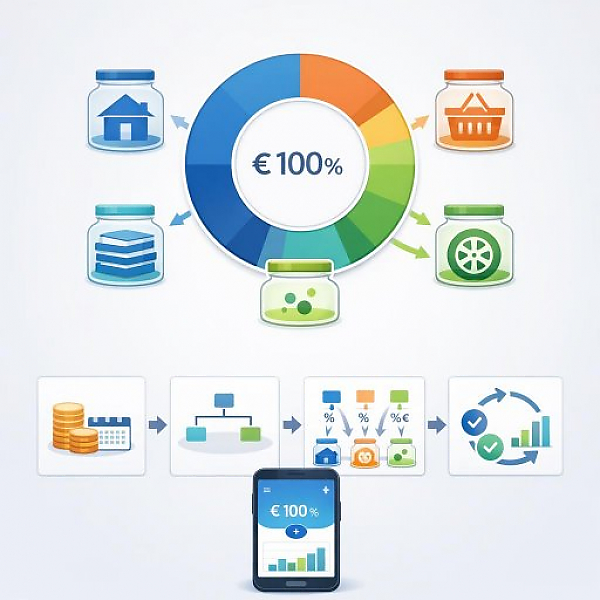
Below is a simple four-step process. It helps you create your first basic budget in a digital household budget book like MyMicroBalance.

Step 1: Record monthly net income and define the budget period

  • Write down your total monthly net income. This is the money you receive after taxes and social security contributions (for example salary, pension, or other regular payments).
  • If your income fluctuates, you can estimate a realistic average month. Use several past months as a reference.
  • Choose a fixed budget period. Typically, this is a calendar month (1st to 30th/31st).
  • Enter the income in your budget book, for example as recurring income in MyMicroBalance.

Step 2: Create 4–6 main categories and suitable subcategories

Now you structure your expenses. Start with a few clear main categories and then add subcategories.

  • Create 4–6 main categories in your budget book, for example:
    • Housing
    • Living expenses
    • Transportation
    • Contracts / subscriptions
    • Miscellaneous
  • Add sensible subcategories underneath. Examples:
    • Housing: rent/loan, electricity, heating, water, utilities
    • Living expenses: groceries, drugstore, clothing, household
    • Transportation: public transit, fuel, car costs, bike
    • Contracts / subscriptions: internet, cell phone, insurance, streaming
    • Miscellaneous: leisure, hobbies, gifts, reserves, unplanned
  • Make sure every regular expense fits into a subcategory. If something is missing, add the category.
  • In MyMicroBalance, you can build this structure in the categories and change it at any time later.

Step 3: Set a rough budget range per category and enter a limit

Now you allocate your net income to the main categories. This is the core of your basic budget.

  • Start with your net income as 100%.
  • Assign each main category a budget range. This can be a percentage range or a euro amount.
    • Example with €2,000 net:
      • Housing: €700
      • Living expenses: €500
      • Transportation: €250
      • Contracts / subscriptions: €250
      • Miscellaneous: €300
  • Check whether the sum of all budgets roughly matches your net income. Small rounding differences are normal.
  • Enter these amounts as a spending limit per category in your digital budget book. In MyMicroBalance, you can use the category budget feature for this.
  • Important: This is only an initial framework. It’s meant to provide guidance, not to prevent every deviation.

Step 4: Assign ongoing transactions and review the basic budget regularly

Your basic budget only becomes useful when you consistently record your expenses and assign them to the right category.

  • Record every expense promptly in your budget book, for example right after shopping.
  • Select the appropriate subcategory for each transaction. This way, amounts automatically accumulate in the correct main category.
  • Keep an eye on your limits during the month. Digital tools like MyMicroBalance show you how much budget is still available in each category.
  • Do a quick review at the end of the month:
    • Which categories stayed within the planned budget?
    • Where were there significant overruns or large remaining balances?
  • Adjust your basic budget if it doesn’t match your reality:
    • Increase or decrease budget amounts if you consistently plan too high or too low.
    • Add categories or combine them if the structure feels confusing.

How to use your basic budget effectively

A well-maintained basic budget helps you keep a clear overview of your spending groups. It alerts you early when certain areas are taking up more room in your day-to-day finances than you expected.

  • Use the basic budget as a starting point. It doesn’t have to be perfect—it can evolve with you.
  • Observe over several months how your expenses are distributed. Over time, this creates a realistic picture of your personal cost structure.
  • If your life situation changes (for example a move, a new car, changed contracts), adjust the basic budget again.

With a digital household budget book like MyMicroBalance, you can implement these steps easily: record income, create categories, set limits, and review your analyses regularly. This turns your basic budget into a stable foundation for all further decisions around your money.

Download the Budget Tracker MyMicroBalance for Windows, Android or iOS