
24. March 2026 | Product Updates

MyMicroBalance 6.1.0: The Ultimate CSV Import and Smart Features for Your Financial Planning

MyMicroBalance 6.1.0: The Ultimate CSV Import and Smart Features for Your Financial Planning

The new MyMicroBalance 6.1.0 update is here, bringing features that make managing your budget book easier, safer, and clearer than ever before. The absolute highlight: A completely reimagined CSV import that effortlessly processes even the most complex bank data. All updates in this version are also fully usable in the free version.

The new Smart CSV Import Assistant: Reading bank data made easy (without limitations in the free version of MyMicroBalance)

Whether you keep a simple cash book or manage complex export files from various banks – data import is often the biggest hurdle. With our new intuitive 3-step assistant, manual typing is finally a thing of the past. We have completely rethought the import process to make life easier for tech novices and data professionals alike.
3 simple steps to the perfect import

  • Step 1: Select file & detect format: Simply drag and drop your file (.csv, .txt, .tab, .asc) into the program. The assistant automatically adapts to commas, semicolons, tabs, and even exotic formats (such as values enclosed in quotation marks).
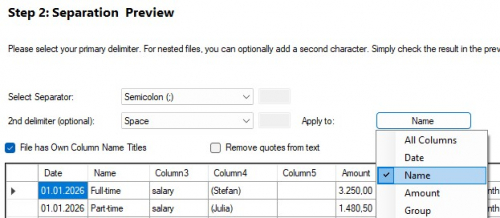
  • Step 2: Multi-level column mapping: Now select the appropriate delimiter to separate your data file into individual fields. The special feature: You can optionally select a second delimiter and apply it only to specific columns of the file. This allows you to import even more complex data files that cause many other programs to fail. 

    mmb-import-2-2.jpg

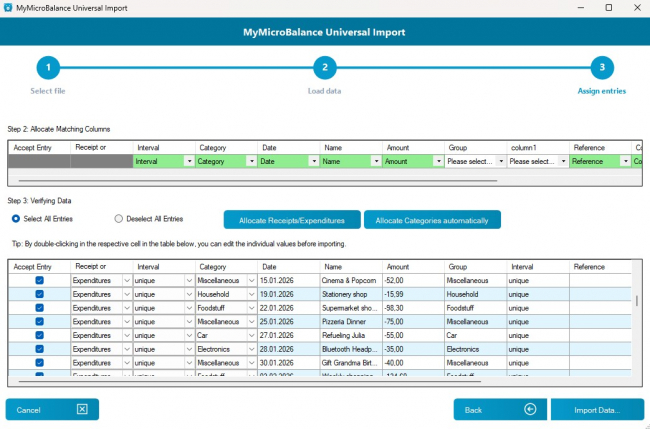
  • Step 3: Check, correct & automatically categorize data: In the clear preview, you can finally adjust and edit amounts directly before importing. With just one click, the system analyzes the payment references and automatically assigns income and expenses to the correct categories (like "Groceries" or "Rent") using known keywords. Furthermore, you determine row by row what should actually be imported, ensuring nothing is duplicated in your budget book. 

    mmb-import-2-2.jpg

Why MyMicroBalance is the perfect budget book for complex CSV files

Anyone looking for a budget book with maximum CSV flexibility will find the perfect solution here. The Universal Import meets the most modern requirements in a user-friendly interface:

  • Maximum flexibility: Supports dynamic delimiters, dynamic header rows, and complex character encodings (UTF-8, ANSI).
  • Robust error handling: The sandbox principle allows for secure data validation and bulk editing before actual saving.
  • Learning categorization: Automatic detection reliably assigns recurring transactions based on your historical data.
  • Automatic data verification: The validation logic for date and amount ensures that the data is read correctly. 

Conclusion: The new import wizard makes recording finances easier than ever before. Complex in the background, child's play to use!

A quick look into your financial future (also in the free version)

Have you ever wondered what the rest of the month looks like financially while checking your current daily balance? If the "Balance up to today" filter is active in the current month, simply hovering the mouse over the large income, expense, or balance boxes at the bottom of the screen is now enough. A new, smart info window immediately shows you a detailed breakdown: the total balance for the month, the current status up to today, and the future balance. This gives you a perfect overview of your full financial planning without having to switch filters.
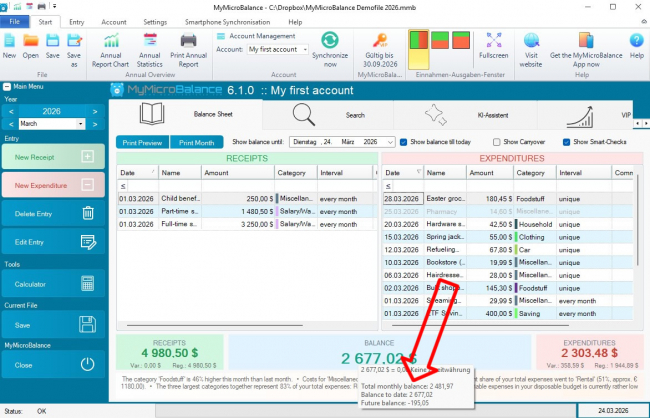
mmb-balance-preview.jpg

Targeted analysis: More clarity for income and expenses (also in the free version)

For an even better budget evaluation in the annual overview, we have expanded the "Group overview" and "Group history" tabs. You can now specifically control which categories are listed via new checkboxes:
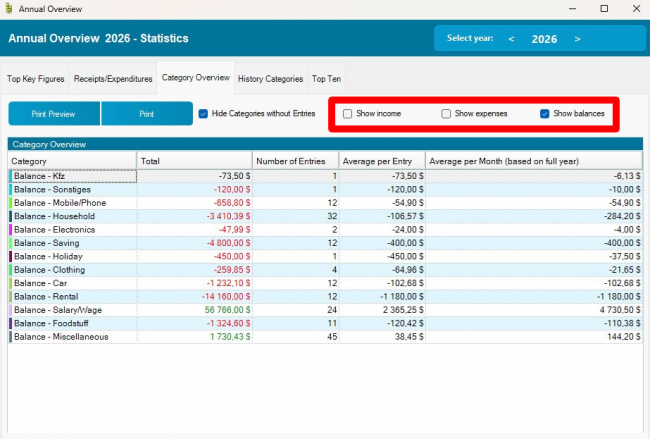
  • Focus on the essentials: Hide income to concentrate purely on your expenses (or vice versa).
  • Better analysis: The isolated view makes it significantly easier to identify financial trends.
  • Clutter-free view: Hide unneeded categories for more clarity when you have many entries.
  • Automatic synchronization: Your settings are automatically applied between the group overview and the group history and saved with your file.

mmb-category-stats.jpg

More screen space: Flexibly hide Smart-Checks

Using the new "Show Smart-Check" checkbox, you can now decide for yourself whether the intelligent evaluations at the bottom of the screen are displayed. If you uncheck the box, the lists for your income and expenses expand downwards – creating significantly more space and clarity for your entries. As soon as you check the box again, you seamlessly return to the familiar view including the helpful tips. This is also an advantage for users of the free version, as the content of the Smart-Check is only available for VIP customers with a license key, allowing the space in the free version to be fully utilized again.
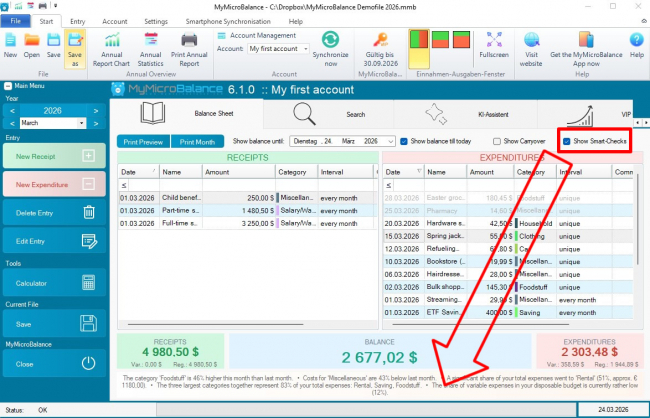
mmb-smartchecks-hide.jpg

Even more security for your data when saving (basic feature for all users)

We have completely overhauled the saving process from the ground up and made it more robust. A new background procedure ensures that your original file remains intact even during unforeseen interruptions – such as intervening virus scanners, cloud synchronizations, or PC crashes. If a file is blocked, MyMicroBalance warns you in good time and securely. Your valuable financial data is thus even better protected against accidental data loss.


Download the Budget Tracker MyMicroBalance for Windows, Android or iOS






