

To get detailed help please click on one of the following topics. You can also scroll though the list to find new features and learn more about the budget planning tool MyMicroBalance.
First Steps
Analysis
Main User Interface
Auto Open File lets MyMicroBalance load a specific balance file directly when the program starts. You therefore do not have to select that file manually in the start window every time.
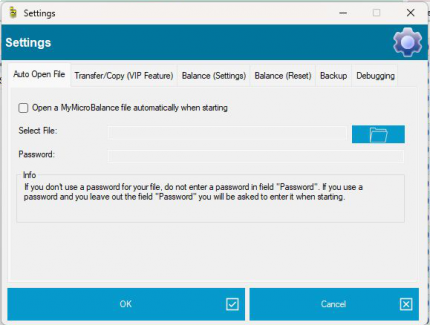
If the file is password-protected, you can optionally enter the password in the Password field. If you leave this field empty, MyMicroBalance still selects the file automatically but asks for the password when opening it.
Only store the password in this setting when the PC is sufficiently protected and no other person can access your Windows user account. If you are unsure, leave the password field empty.
Clear the configured file selection or disable Open a MyMicroBalance file automatically when starting if MyMicroBalance should display the start window again.





 1
1 2
2 3
3 4
4