

To get detailed help please click on one of the following topics. You can also scroll though the list to find new features and learn more about the budget planning tool MyMicroBalance.
First Steps
Analysis
Main User Interface
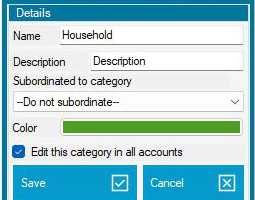
VIP Category Editing lets you create, edit, or delete categories not only in the currently open account but, when required, in all existing accounts in your file.
This saves time if you work with several accounts and want to use the same category structure in all of them. The feature is available with a VIP license key.
The new category is then available not only in the current account but also in the other existing accounts in your file.
When editing a category, you can also decide whether the change applies only to the current account or to all accounts. This is useful when you want to rename a category or standardize your category structure.


 1
1 2
2 3
3 4
4