

To get detailed help please click on one of the following topics. You can also scroll though the list to find new features and learn more about the budget planning tool MyMicroBalance.
First Steps
Analysis
Main User Interface
Change Password lets you protect an unsecured MyMicroBalance file, replace an existing password, or remove password protection.
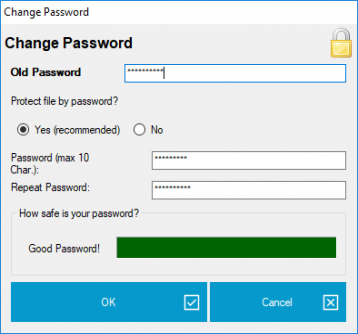
If the file does not yet have a password, select Yes (recommended), enter a new password, and repeat it to prevent typing errors. The password can contain a maximum of 10 characters. Save the balance file after confirming the dialog.
If the file is already protected, first enter the current password in Old Password. Then enter and repeat the new password. The strength indicator under How safe is your password? helps you avoid an easily guessed password.
Open the dialog, enter the current password, and select No under Protect file by password?. Confirm the dialog and save the balance file.
Keep the password in a secure place. The MyMicroBalance Support Team cannot centrally decrypt or restore a balance file if its password has been forgotten.





 1
1 2
2 3
3 4
4